
If you are an SCCMLS member, and you also access the residential MLS as a member of the CHS Regional MLS, then you are what we call a Dual User! As such, there are a few things that are important to note, and you’ll want to bookmark this page for future reference.
If you know how to login, skip to the Dual Working Options section further below.
YOUR LOGIN DESTINATION SITE
Each database has its own login destination.
Your CHS Regional MLS access destination: CHSMLS.com.
Your SCCMLS access destination: SCCommercialMLS.com
YOUR LOGIN USERNAME AND PASSWORD
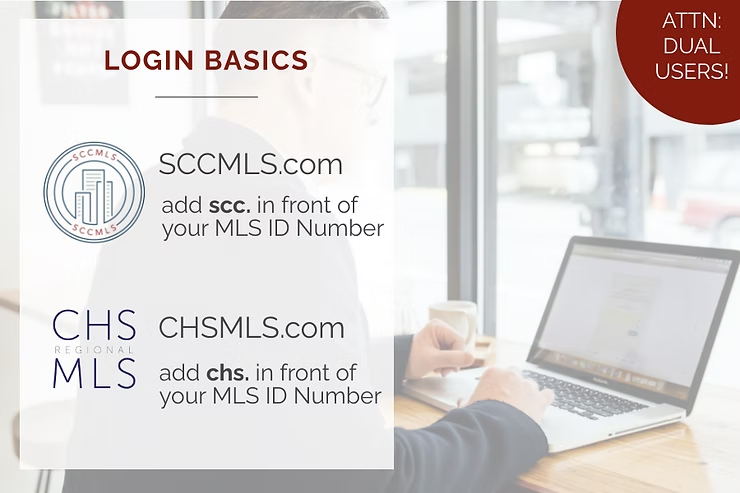
Access the commercial database at SCCommercialMLS.com with the scc. prefix before your MLS ID number.
Access the residential database at CHSMLS.com with the chs. prefix before your MLS ID number.
DUAL WORKING OPTIONS:
1. TWO BROWSERS
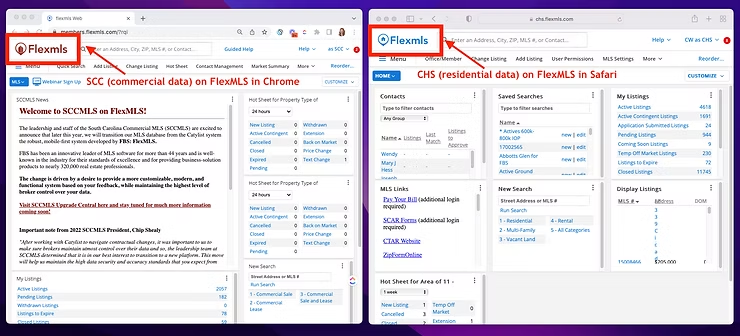
Because the commercial and residential MLSs are individual databases, but built on the same software, we as staff have gotten into the habit of using 2 browsers, so that we can work in both all day. While this isn’t required, it helps, because each browser stores cookies (bits of data) behind the scenes that allow pages to load faster, recall information, and track history. When that stored data conflicts with a new login session because you switched from one database to another, it can cause browser glitches.
Let us help you avoid that! This is how we tend to operate in the shot below (plus 341 other tabs). You’ll see a session running in the commercial database on the left, in Chrome, and the residential database on the right, in Safari. With this, we can work all day with no interruptions, and no browser glitches, because our login sessions remain separate between each database.
What browsers are available?
FlexMLS is well built and will operate well on any browser. While Chrome tends to be our favorite, any on this list is a great option to mimic our dual work flow.
2. ONE BROWSER + INCOGNITO MODE
If you’d prefer not to have two browsers on your machine, no problem! You can have the same functionality as above by using the private or incognito mode within your browser of choice.
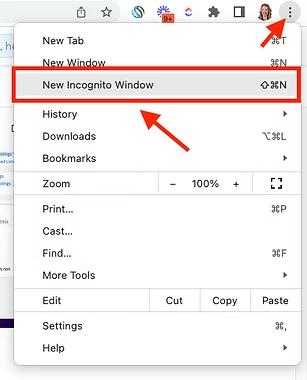
Simply open your browser settings menu and click to open a new incognito session. In some browsers this is called a private session.
Learn how to use this feature in your browser of choice by clicking below:
3. ONE BROWSER + TWO PROFILES
A similar option is to utilize a single browser, but utilize a secondary “profile”in the browser settings. This allows your data that is stored in the browser history, etc, to be tracked only within one profile, so that it does not interact with data from your other sessions.
For example, whichever database you access most, would be bookmarked and used in your main browser profile. To access your secondary database without interrupting either session, you would use a guest profile or add yourself as a secondary profile, both seen here.
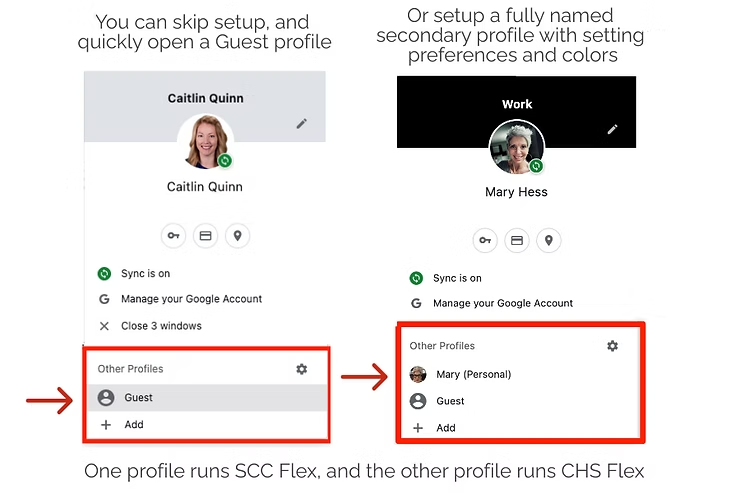
Learn how to use this feature in your browser of choice by clicking below (not offered in Safari).
- Google Chrome as a guest or with full profiles
- Microsoft Edge
- Mozilla Firefox
While none of these working styles are necessary to login to each system, it does make the dual working experience ideal!
If you struggle with dual working, contact us at Support@SCCMLS.com and we can schedule a screen-sharing session to help.
You also have access to the Flexmls Pro app, which may be used for both accounts. iOS users may easily toggles between both accounts. Android users will need to login to each account manually. Read more here!